How to Program the ESC in an RC Car
Learn to program your RC car's ESC like a pro and own the track with these simple steps.
By Elite Radio Control teamUpdated 5 min read
Part of the guide: RC electronics: batteries, motors and ESCs
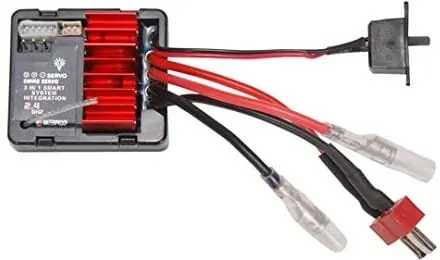
This time we’re looking at how to program the ESC in an RC car. The ESC, or electronic speed controller, is an essential part of any electric RC car, because it’s in charge of controlling the vehicle’s speed and direction.
Programming the ESC correctly is key to getting the best performance out of your RC car and tailoring it to the way you like to drive.
Below we walk you through the basic steps to program your ESC and get the most out of your car.
Steps to program the ESC
- Preparation: Before you start, make sure you have the ESC’s instruction manual handy. Every ESC model can have its own programming method, so it’s important to follow the specific directions for your controller.
- Connection: Connect the ESC to the battery and to the RC car’s motor following the manufacturer’s instructions. Make sure every wire is properly connected and there are no short circuits.
- Programming mode: Some ESCs have a physical button to enter programming mode, while others use a sequence of button presses or signals from the transmitter. Check the manual to find out how to enter programming mode on your particular ESC.
- Settings: Once you’re in programming mode, you can set different parameters, such as braking, throttle response, speed limit and so on. Read the manual carefully to understand what each setting means and how it affects the way the RC car behaves.
- Test and fine-tune: After programming the settings you want, test the car in a safe, flat area to see how it responds. If needed, make further adjustments until you get the performance you’re after.
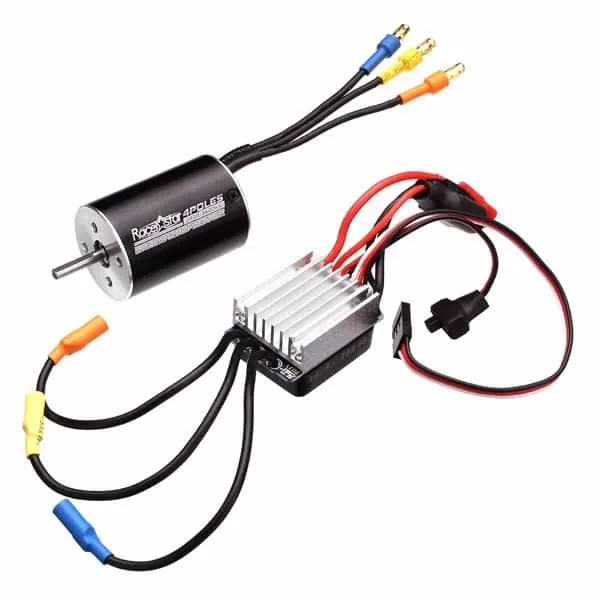
Does the ESC programming process differ by brand or model?
Yes, the process for programming an RC car’s ESC (electronic speed controller) varies with the brand and model. Each manufacturer can use its own programming software and offer different options and features. Some brands have a more intuitive, easy-to-use programming interface, while others call for more technical knowledge to adjust the ESC’s parameters.
On top of that, depending on the ESC model, you’ll find different configuration options, such as switching frequency, supported battery type, supported motor type, electronic braking and overheat protection, among others. These options vary with the brand and model of the ESC.
That’s why it’s important to read the instruction manual supplied by the maker of the specific ESC you’re using and follow its programming instructions. Depending on the ESC, you may also need a dedicated programming card or a special connection to do the programming.
What are the steps to program an RC car’s ESC?
Programming the ESC (electronic speed controller) of an RC car involves a series of steps. Here are the general ones:
- Connect the ESC: Connect the ESC to the RC car’s receiver following the manufacturer’s instructions. Make sure every wire is properly connected.
- Set neutral: Turn on the RC car’s transmitter and make sure the throttle is in the neutral position. This lets the ESC recognize the throttle signal.
- Find the programming method: Check the ESC manual to see how its programming mode works. Some ESCs have a programming button, while others use a combination of throttle inputs to enter programming mode.
- Enter programming mode: Follow your ESC’s specific instructions to enter programming mode. This may mean holding a button down for several seconds or running a specific sequence with the throttle.
- Set the parameters: Once in programming mode, you can adjust the ESC’s parameters. These can include battery type, current limit, brake settings and throttle response, among others. Check the ESC manual to learn what each parameter does and set them to your liking.
- Save the settings: Once you’ve adjusted the parameters, save them as your ESC’s instructions describe. This may mean holding a button down or running a specific sequence with the throttle.
- Test the ESC: After saving the settings, test the ESC to make sure it works properly. Check that the car responds correctly to the throttle and the brake.
Always remember to check the manual for the specific ESC you’re using, since the steps can vary slightly between brands and models.
What are the main functions you can program on an RC car’s ESC?
On an RC (radio control) car’s ESC (electronic speed controller), the main functions you can program are:
1. Speed control: Lets you set the maximum speed the RC car can run at. This is handy for matching the speed to different track conditions or driver skill levels.
2. Braking: Lets you set how hard the car brakes when you release the throttle trigger. This helps you keep better control of the car in corners and avoid crashes.
3. Acceleration: Lets you adjust throttle response, in other words how quickly the RC car accelerates when you pull the throttle trigger. This helps match the car’s sensitivity to the driver’s preferences.
4. Driving modes: Some ESCs let you program different driving modes, such as race mode, practice mode or crawl mode. Each mode can have its own speed, brake and acceleration settings.
5. Motor protection: Some ESCs include protection features for the motor, such as limiting the maximum current or temperature. This helps prevent motor damage from overuse or extreme conditions.
6. Low-voltage cutoff: Lets you set the minimum voltage at which power to the motor is cut, so the battery doesn’t get over-discharged. This is important for extending battery life and avoiding damage.
7. Forward/reverse: Some ESCs let you program the motor’s direction so you have the option to drive forward and in reverse. This is common on four-wheel-drive RC cars.
These are just some of the main functions you can program on an RC car’s ESC. What’s available, and how it works, varies with the ESC’s model and brand.
Wrapping up
Programming your RC car’s ESC is a crucial step to get the most enjoyment out of your vehicle. By following these basic steps and always checking your ESC’s instruction manual, you can customize how your car drives to suit your preferences and get the best possible driving experience.
Keep in mind that every ESC can have its own quirks, so it’s important to follow the specific directions for your model. Have fun programming and driving your RC car!
Related guides
RC cars
Brushless vs Brushed Electric RC Motors: Which Is Better?
Learn the difference between brushless and brushed electric motors in RC cars. Don't miss this complete guide!
5 min read
RC cars
What Is an ESC: How It Works, How to Choose One and How to Install It
The ESC controls how much power reaches your RC car's motor. What it does, which specs to look at, what size you need and how to mount and connect it.
4 min read
RC cars
8 Tips for Choosing Your RC Transmitter
Find the best transmitters for RC cars in this post, and run your races like a real pro!
5 min read
RC cars
How to Fix the ESC in Your RC Car
Learn how to fix the ESC in your RC car and get back on the track in no time. Don't let a technical glitch ruin your fun!
3 min read